



12 Common Gearless Flexo Printing Press Problems and How to Solve Them
Introdução
If you’re operating a Impressora flexográfica sem engrenagens, you know how amazing it is to achieve high-speed, high-quality flexo prints—but even the most advanced presses like the Lisheng Gearless Flexo Printing Press come with their own set of challenges. From registration issues to ink transfer problems, knowing what to look out for and how to troubleshoot can save you downtime and enhance your flexo printing quality. Whether you’re in South America, Vietnam, North Africa, the Middle East, or Hong Kong, understanding these common problems ensures smoother operations and better results.
Understanding Gearless Flexo Printing Presses

-
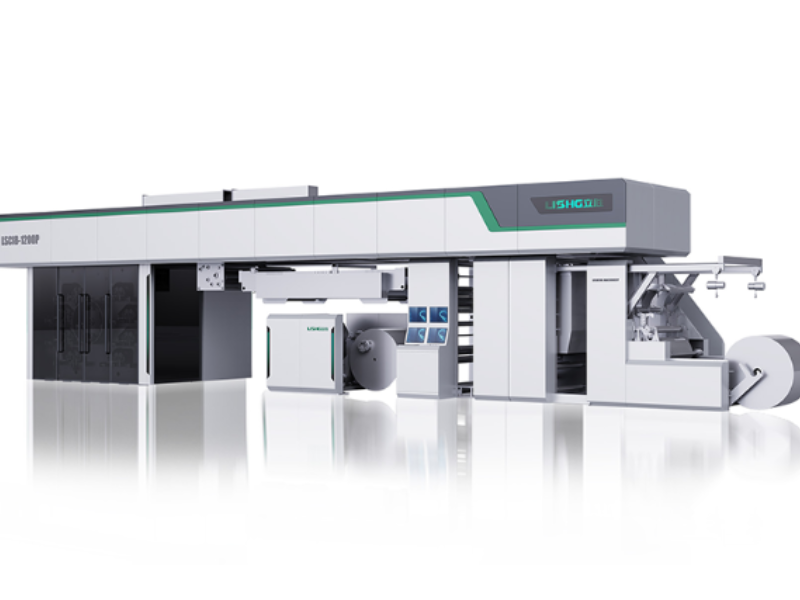
Max material width: 1200 mm
-
Printing width: 1160 mm
-
Mechanical speed: 420 m/min
-
Max printing speed: 350–400 m/min (depending on material & design)
-
Substrate compatibility: Paper, PE, PET, BOPP, PVC
-
Printing repeat length: 400–800mm
-
Power: 380V, 3PH, 50/60Hz
This advanced full servo system ensures fully automatic color registration, faster production, and lower maintenance costs. But even with these advantages, operators face certain flexo printing defects that can affect production efficiency and print quality.
Common Flexo Printing Press Problems

Registration and Color Misalignment Issues
Problem Overview:
Registration problems are among the most common challenges in a Impressora flexográfica sem engrenagens. Misaligned colors, blurred edges, or overlapping text can significantly reduce flexo print quality and increase material waste.
Causes:
-
Miscalibrated servo drives in gearless presses
-
Uneven web tension across printing zones
-
Misaligned plate cylinders or sleeves
-
Material stretch during high-speed printing
Impact on Production:
-
Increased waste and rework
-
Slower production due to frequent adjustments
-
Poor packaging aesthetics, affecting customer perception
Solutions & Best Practices:
-
Use automated servo-controlled color registration for precision
-
Regularly inspect and align cylinders and plate sleeves
-
Maintain consistent web tension using tension sensors
-
Monitor material stretch, especially on films like PET, BOPP, or PVC
Ink Transfer Problems and Streaking
Problem Overview:
Uneven ink distribution, streaks, or missing spots are common flexo printing defects. Ink transfer issues can ruin flexo print quality, especially when producing multi-color packaging.
Causes:
-
Worn or clogged anilox rolls, reducing consistent ink distribution
-
Improper doctor blade pressure or alignment
-
Ink viscosity not adjusted for material or press speed
-
Temperature fluctuations in the pressroom affecting ink flow
Impact on Production:
-
Visible streaks or inconsistent colors
-
Increased downtime due to cleaning and maintenance
-
Higher consumption of ink and substrate due to defective prints
Solutions & Best Practices:
-
Regular cleaning and inspection of anilox rolls and doctor blades
-
Adjust ink viscosity for each substrate and speed setting
-
Use high-quality flexo inks compatible with Lisheng flexo printing presses
-
Monitor pressroom environment for stable temperature and humidity
Web Tension, Wrinkling, and Material Handling Problems
Problem Overview:
Web tension issues can cause wrinkling, stretching, or even web breaks during printing, especially at high speeds on Impressoras flexográficas sem engrenagens. This directly affects flexo printing quality control.
Causes:
-
Incorrect tension settings in different zones of the press
-
Substrate inconsistencies (thickness variations, stretchable films)
-
Roll diameter inconsistencies or uneven winding
-
Static buildup in synthetic films affecting smooth feed
Impact on Production:
-
Material waste and reprints
-
Reduced machine uptime
-
Poor print registration and uneven color
Solutions & Best Practices:
-
Implement zone-specific tension control systems
-
Install tension sensors and feedback loops for real-time adjustment
-
Use anti-static devices to prevent static-induced web slippage
-
Verify substrate properties (thickness, stiffness, elasticity) before printing
Cylinder, Sleeve, and Plate Wear
Problem Overview:
Mechanical wear in cylinders, sleeves, and plates can cause ghosting, dot gain, and inconsistent ink transfer, leading to visible flexo printing defects.
Causes:
-
Long-term use without proper maintenance
-
Uneven mounting of plates or sleeves
-
Hard spots or surface damage on cylinders
-
Incompatible materials causing uneven wear
Impact on Production:
-
Reduced print sharpness and clarity
-
Frequent need for reprints or plate replacement
-
Increased maintenance costs
Solutions & Best Practices:
-
Conduct regular inspection of plate cylinders and sleeves
-
Mount plates with precision, following recommended torque specifications
-
Replace worn or damaged sleeves promptly
-
Use high-quality substrates compatible with Lisheng Gearless Flexo Printing Press
Servo Drive, Motor, or Gearless System Malfunctions
Problem Overview:
Even though Impressoras flexográficas sem engrenagens remove traditional gears, servo drive or motor issues can still affect performance. Problems in this area lead to registration drift, uneven speeds, and vibrations that impact flexo printing quality.
Causes:
-
Servo motor overheating or electrical faults
-
Encoder or sensor malfunctions
-
Software or firmware issues in the full servo control system
-
Improper maintenance of drive components
Impact on Production:
-
Unplanned downtime and reduced output
-
Inconsistent printing speeds affecting registration and ink coverage
-
Increased operator intervention and troubleshooting time
Solutions & Best Practices:
-
Monitor servo motor temperatures and operating parameters
-
Conduct regular preventive maintenance on drive and servo systems
-
Keep firmware and control software up-to-date
-
Train operators in flexo printing troubleshooting and real-time adjustments
Other Common Flexo Printing Issues
-
Ghosting or banding: Often caused by uneven cylinder pressure or ink contamination
-
Static buildup: Can lead to web handling problems and print inconsistencies
-
Plate contamination: Dust or debris can leave defects on prints
-
Environmental factors: Temperature and humidity fluctuations affecting ink drying and color stability
Solutions:
-
Regular cleaning of the press and plates
-
Use anti-static devices and maintain a controlled pressroom environment
-
Perform frequent quality checks for early detection of defects
Ink Drying and Set-Off Issues
Problem Overview:
Insufficient ink drying or premature contact between printed layers (set-off) is a frequent flexo printing defect, especially on films and coated papers. It affects the final flexo printing quality and can lead to smudges or stuck rolls.
Causes:
-
Incorrect drying temperature or insufficient air flow
-
Over-inking or too-thick ink layers
-
High-speed production without adjusting drying units
-
Low-quality inks or substrates with low absorbency
Impact on Production:
-
Smudged prints or stuck webs
-
Increased waste and downtime for cleaning
-
Difficulty in maintaining consistent color reproduction
Solutions & Best Practices:
-
Optimize drying temperature and airflow for the substrate type
-
Adjust ink film thickness according to flexo print quality issues
-
Use high-quality inks compatible with Lisheng Gearless Flexo Printing Press
-
Regularly clean dryer units and check for dust or debris
Dot Gain and Color Density Variations
Problem Overview:
Excessive dot gain or uneven color density is a classic flexo printing issue. It reduces image sharpness and print consistency, especially in packaging for luxury or high-end products.
Causes:
-
Excessive pressure between plate and substrate
-
Worn or damaged anilox rolls
-
Ink viscosity too low or too high
-
Substrate absorbency differences
Impact on Production:
-
Inconsistent color reproduction across a print run
-
Reduced product aesthetics
-
Need for frequent operator intervention
Solutions & Best Practices:
-
Regularly inspect and replace worn anilox rolls
-
Adjust doctor blade pressure and ink viscosity for consistent results
-
Maintain proper substrate handling
-
Monitor color density during production using inline inspection systems
Ghosting and Banding in Prints
Problem Overview:
Ghosting (faint repeat patterns) or banding (horizontal stripes) are common flexographic printing defects, often seen on large runs with high-speed presses.
Causes:
-
Cylinder vibration at high speeds
-
Plate compression or misalignment
-
Irregularities in anilox roll engraving
-
Inconsistent substrate tension
Impact on Production:
-
Poor visual quality of packaging
-
Increased material and ink waste
-
Need for press stoppage and adjustments
Solutions & Best Practices:
-
Use vibration-damping supports for cylinders
-
Check plate and sleeve mounting for alignment issues
-
Ensure anilox rolls are in good condition and properly engraved
-
Maintain consistent tension across the web path
Static Build-Up and Material Handling Problems
Problem Overview:
Static electricity on plastic films like PET, BOPP, or PVC can lead to web misalignment, sheet sticking, and other flexo printing defects.
Causes:
-
Low humidity environments in pressroom
-
High-speed web movement creating friction
-
Lack of anti-static devices along the web path
Impact on Production:
-
Web breaks and misregistration
-
Ink spatter or uneven print
-
Slower production speed due to frequent stops
Solutions & Best Practices:
-
Install anti-static bars or ionizing devices along the web path
-
Maintain pressroom humidity within recommended levels
-
Ensure operators are trained in flexo printing troubleshooting for static issues
Plate Contamination and Debris Problems
Problem Overview:
Debris, dust, or leftover ink on plates and sleeves can lead to small defects, spots, or flexo printing quality issues, which are especially noticeable in high-end packaging.
Causes:
-
Dirty plate mounting area
-
Improper cleaning of sleeves between runs
-
Environmental dust or pressroom contamination
Impact on Production:
-
Minor but visible defects affecting product appeal
-
Increased rework and material waste
-
Potential customer complaints
Solutions & Best Practices:
-
Clean plates and sleeves before every run
-
Use dust-free environments or enclosures for sensitive prints
-
Implement quality checks using inline inspection systems
Substrate Stretch or Deformation
Problem Overview:
Some films or papers may stretch or deform during high-speed runs, causing flexo print quality defects like misalignment, elongation of graphics, or inconsistent ink density.
Causes:
-
Incompatible substrate with press speed
-
Uneven tension settings in the press
-
High-pressure roller settings
Impact on Production:
-
Misregistration and image distortion
-
Increased scrap rates
-
Difficulty maintaining consistent print quality
Solutions & Best Practices:
-
Select substrate types suitable for Impressora flexográfica sem engrenagens speeds
-
Optimize tension settings across all zones
-
Adjust roller pressure based on material properties
Gearless Flexo Printing Defects Table
| Problem | Cause | Solution / Best Practices |
|---|---|---|
| Registration and Color Misalignment | Miscalibrated servo drives, uneven web tension, misaligned cylinders/sleeves, substrate stretch | Regular servo calibration, precise plate mounting, automated tension control, monitor material stretch |
| Ink Transfer Problems / Streaking | Worn or clogged anilox rolls, improper doctor blade pressure, ink viscosity issues, temperature fluctuations | Clean anilox rolls & doctor blades, adjust ink viscosity, use high-quality inks compatible with Lisheng presses, monitor pressroom environment |
| Web Tension & Wrinkling | Uneven tension across zones, substrate inconsistencies, roll diameter irregularities, static buildup | Implement zone-specific tension control, use tension sensors and feedback loops, anti-static devices, check substrate properties |
| Cylinder, Sleeve, and Plate Wear | Long-term use, improper mounting, hard spots on cylinder/sleeve, incompatible materials | Inspect cylinders/sleeves regularly, follow proper mounting torque, replace worn sleeves, use compatible substrates |
| Servo Drive / Motor Malfunctions | Motor overheating, encoder/sensor issues, software/firmware errors, insufficient maintenance | Monitor servo motor temperature, regular preventive maintenance, firmware updates, train operators in troubleshooting |
| Ink Drying & Set-Off | Insufficient dryer temperature, over-inking, high-speed production, low-absorbency substrate | Optimize drying temperature & airflow, adjust ink thickness, use compatible inks, clean dryer units regularly |
| Dot Gain & Color Density Variations | Excessive plate/substrate pressure, worn anilox rolls, ink viscosity issues, substrate absorbency differences | Inspect & replace worn anilox rolls, adjust doctor blade & ink viscosity, maintain substrate consistency, monitor color density |
| Ghosting / Banding | Cylinder vibration, plate compression/misalignment, irregular anilox engraving, inconsistent tension | Use vibration-damping supports, align plates/sleeves, check anilox rolls, maintain consistent web tension |
| Static Build-Up | Low humidity, high-speed friction, absence of anti-static devices | Install anti-static bars/ionizers, maintain pressroom humidity, train operators in troubleshooting |
| Plate Contamination / Debris | Dust, leftover ink, dirty plate mounting area, pressroom contamination | Clean plates & sleeves before runs, dust-free pressroom, inline inspection |
| Substrate Stretch / Deformation | Incompatible substrate, uneven tension, high roller pressure | Select suitable substrates, optimize tension, adjust roller pressure |
| Environmental Factors (Temperature & Humidity) | Ink drying variations, color inconsistency, static buildup | Control pressroom temperature & humidity, adjust ink formulation, maintain stable environment |
Case Study: Lisheng Gearless Flexo Press in Action
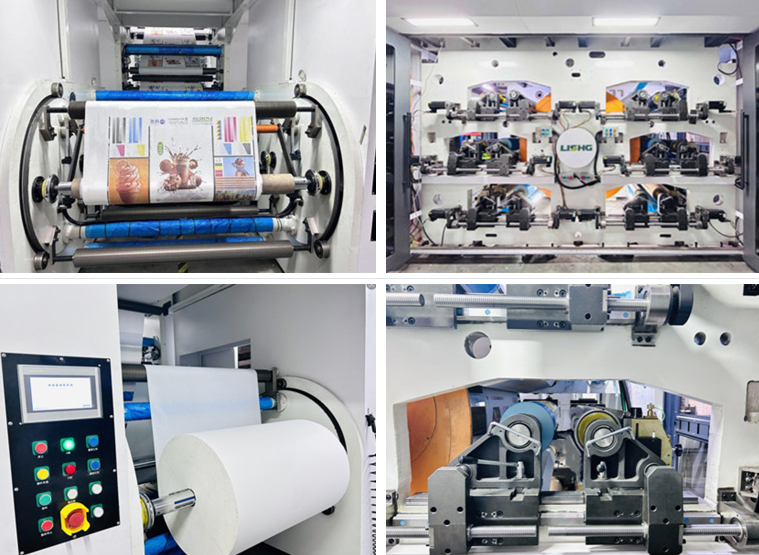
After upgrading to the Lisheng 8 Colors Full Servo Gearless Flexographic Printing Machine, they achieved:
-
Automated Color Registration: Eliminated misalignment across eight colors, improving flexo print quality and reducing waste.
-
High-Speed Production: Up to 420 m/min mechanical speed and 350–400 m/min material speed without compromising accuracy.
-
Versatile Material Handling: Perfect for paper, PE, PET, BOPP, and PVC substrates.
-
Lower Maintenance: Gearless design reduces mechanical wear and maintenance costs.
-
Consistent Ink Transfer: Advanced anilox calibration and tension control ensured uniform coverage and vibrant colors.
Results:
-
25% increase in machine uptime
-
20% improvement in registration accuracy
-
High-quality packaging output, enhancing brand perception
This case demonstrates how Lisheng Gearless Flexo Printing Presses combine speed, precision, and reliability, making them a trusted choice for modern packaging production.
Conclusão
Running a Impressora flexográfica sem engrenagens comes with challenges, but understanding common flexo printing defects, proper maintenance, and leveraging advanced machines like the Lisheng 8 Colors Full Servo Gearless Flexographic Printing Machine can dramatically improve flexo print quality and production efficiency. Whether you’re focused on registration, ink transfer, or web tension, adopting a proactive approach ensures high-quality, consistent results.
If you want to upgrade your packaging production with reliable, high-speed, and precision-focused printing, choose Lisheng Flexo Printing Presses. Explore our range of Lisheng Gearless Flexo Printing Presses today and take your flexographic printing to the next level.
Perguntas frequentes
Q1: How can I fix registration drift on a Lisheng Gearless Flexo Printing Press?
A: Check servo motor calibration, plate mounting, and web tension. Using automated tension controls improves flexo printing quality.
Q2: What causes ink streaking in flexo printing?
A: Worn anilox rolls, improper doctor blade pressure, or ink viscosity changes. Clean rolls and monitor ink temperature regularly.
Q3: Why does web wrinkling happen in high-speed presses?
A: Uneven tension, substrate stretch, or inconsistent roll diameters. Implement zone-specific tension monitoring to minimize this issue.
Q4: How often should I inspect cylinders and sleeves?
A: Monthly inspection is recommended for high-volume operations. Proper maintenance prevents flexographic printing defects.
Q5: Are Lisheng Gearless Flexo Printing Presses suitable for all materials?
A: Yes, they handle paper, PE, PET, BOPP, PVC, and other flexible packaging materials, making them ideal for food, beverage, and luxury goods packaging.


