



How to Fix Ink Misting in Flexo Printing: Causes and Solutions?
Introduction
If you’ve ever walked past a high-speed flexo printing press and noticed a fine layer of ink covering nearby machines, the floor, or the printing rolls, this is typical ink fogging, also known as “ink splatter” or “ink spray.” It’s more than just a cleaning nuisance; it’s a factor contributing to inefficiency in the printing workshop, causing ink waste, time-consuming cleanup, and machine downtime.
Whether you’re using a compact unitary press or a centralized impression cylinder press, the principles behind ink fogging are the same. In this guide, we’ll explore the root causes of ink fogging and provide troubleshooting methods to help you achieve cleaner, more efficient printing on any flexo printer.
What Is Ink Misting in Flexo Printing?

Ink haze (or ink splatter) refers to the phenomenon where the ink film breaks down into tiny droplets and becomes suspended in the air during the printing process. Ink splatter can lead to serious consequences such as printing defects, safety hazards, machine damage, and material waste. This usually occurs at the impression chamber—where the printing plate contacts the substrate—or where the doctor blade contacts the anilox roller.
When the doctor blade removes excess ink, the ink film is stretched and broken. If the ink cannot break cleanly, it forms fine filaments that break and atomize. This is especially common in high-speed rotary machines d'impression flexo, and excessive misting indicates a disruption in the balance between ink chemistry, mechanical settings, and environmental conditions.
Primary Causes of Ink Misting
To solve the ink misting problem, we must first identify which part is causing the issue. We can summarize the causes into four main categories.
Ink Properties
Ink liquidity is a major cause of fogging.
Viscosity Issues: If the viscosity is too low, the ink lacks internal cohesion and disperses easily. If the viscosity is too high, it may form long, thin filaments that are prone to breakage.
Ink Tack: High-tack inks resist splitting, which can create longer filaments and more mist.
Solvent Balance: Incorrect solvent mixing ratios can affect ink stability. In high humidity environments, solvent-based inks absorb moisture, reducing solubility and leading to blurry printing.
Mechanical & Press Setup Issues
The physical configuration of the printing press determines the ink handling method.
Doctor Blade Angle & Pressure: Insufficient pressure during doctor blade operation leads to excessive ink flow, while excessive pressure causes doctor blade vibration or ink splatter. This issue may manifest differently on Stack flexo printing machine et Machine d'impression flexo CI due to different printing station layouts.
Anilox Roller Condition: Dirty or clogged anilox rollers disrupt uniform ink transfer, leading to excessive ink in some areas and insufficient ink in others, resulting in ink fogging.
Press Speed: High-speed printing on modern Gearless flexo printing press increases the centrifugal force on the ink, exacerbating ink instability.
Impression Settings: Excessive impression pressure can compress ink dots, forcing uncontrolled ink diffusion and even causing ink splatter.
Environmental Factors
The environment of the printing workshop plays a crucial role in the performance of inks.
Humidity: For water-based inks, high humidity slows down drying and affects viscosity. For solvent-based inks, excessive humidity can lead to resin precipitation.
Temperature: High temperatures accelerate solvent evaporation, increasing ink viscosity on the anilox rollers and thus altering ink separation characteristics.
Static Electricity: Static charges can cause abnormal movement of paper or ink particles, leading to ink mist accumulation in unexpected areas.
Substrate & Auxiliary Factors
Non-Porous Substrates: Films and foils do not absorb energy or ink, meaning the force at the pressure rollers is purely mechanical, increasing the likelihood of ink mist formation.
Printing Plate Material: Old or excessively hard printing plates may not transfer ink cleanly and quickly, leading to demoulding problems and potentially tearing the ink film..
Step-by-Step Solutions to Fix Ink Misting
Fix Ink Misting by Optimizing Ink Parameters
Since ink is a fogging medium, the first step is to check its viscosity.
Adjust Viscosity: Regularly check the ink viscosity using a viscosity cup. If fogging occurs, slightly increase the viscosity to improve internal cohesion. Conversely, if the ink is too thick and stringing occurs, decrease the viscosity.
Adjust the Solvent Mixture: Switch to a solvent with a slower evaporation rate. This allows the ink to remain open for a longer time and prevents skinning on the ink surface, thus avoiding fogging.
Consider Conductive Inks: If static electricity is causing fogging, consider using conductive inks, such as water-based inks, which help eliminate the charge that may be causing fogging.
Mechanical & Press Setup Corrections
If the ink is not the issue, check the hardware of the machine d'impression flexo.
Inspect Doctor Blades: Replace worn doctor blades. Then ensure the doctor blade angle is set correctly to produce a clean, crisp shearing action, not a coarse doctor blade effect. The doctor blade angle is typically around 30-35 degrees.
Check Anilox Rolls: Ensure the anilox roller is clean and has the required ink volume. An anilox roller with excessive ink volume will deliver too much ink, increasing the risk of ink fogging. The anilox roller can be cleaned periodically using soda blasting or chemical cleaners.
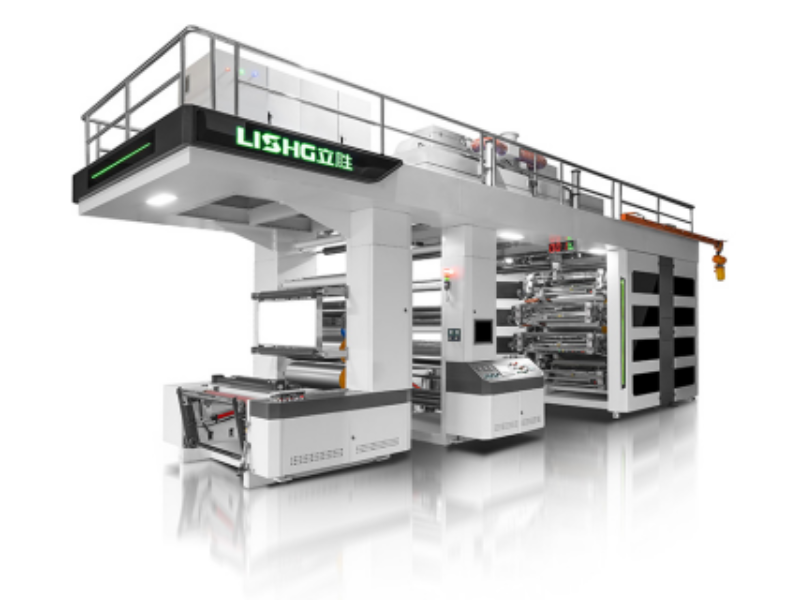
Optimize for Press Type: If you are using a Stack flexo printing machine, ensure that the vertical orientation of the printing unit does not cause ink to drip down to the next unit. For a Machine d'impression flexo CI, carefully check the pressure of the common impression cylinder, since the uniform pressure distribution is crucial.
Reduce Impression Pressure: Slightly reducing the impression pressure of the printing plate can minimize the squeezing caused by lateral ink splatter.
Control the Printing Environment
A stable printing workshop environment is a low-cost, high-efficiency solution.
Humidity Control: Maintain a low temperature and low humidity. Excessively dry air leads to static buildup, while excessive humidity disrupts the solvent balance. Increasing humidity can actually help slow the drying of water-based inks and reduce static electricity, but humidity changes must be closely monitored.
Temperature Stability: Avoid drastic temperature fluctuations. If the temperature of the entire room cannot be controlled, consider insulating the ink supply system. Some printers use summer and winter solvent mixtures to cope with seasonal temperature changes.
Static Eliminators: Install static eliminators near the unwinding machine and pressure rollers to neutralize the charge that attracts ink mist.
Substrate & Plate Improvements
Plate Technology: Upgraded advanced plate surface patterning technology. These plates feature tiny mesh openings that better absorb ink and distribute printing pressure, preventing ink filaments from breaking due to violent shaking and causing fogging.
Plate Backing/ Tapes: Using a softer tape can absorb some of the mechanical shock during printing, resulting in a gentler ink release. This is especially important for high-speed Gearless flexo printing presses, which have minimal vibration but high speeds.
Quick Misting Diagnosis Checklist

When your flexo printer exhibits fogging, check the following in order:
Ink Viscosity: Was it measured today? Is the viscosity stable?
Doctor Blade: Is it new or worn? Is the pressure correct?
Anilox Roll: Has it been cleaned regularly? Is the ink quantity appropriate?
Printing Press Configuration: Is it a Stack flexo printing machine or a Machine d'impression flexo CI?
Environment: Are the humidity (%) and temperature (°C/°F) within specifications?
Printing Speed: Does fogging occur at specific speed thresholds? Note the operation of Gearless flexo printing press at increased speeds.
Printing Plate Condition: Is there any wear? Is the hardness correct?
Static Electricity: Is the paper roll statically charged? Is the doctor blade functioning properly?
Long-Term Prevention Strategies
Standardize Operating Procedures: Establish formal records of ink viscosity, anilox roller usage, and impression settings. Following standardized operating procedures can prevent problems caused by improper operation.
Preventive Maintenance: Regularly check the wear and tear of the anilox rollers and doctor blades. Monitor the mileage of the anilox rollers to identify when maintenance is needed.
Training: Ensure your press operators understand the specific reasons behind each setting. Addressing all potential ink splatter issues before the press is operational requires significant operator expertise.
Leverage Technology: Modern Gearless flexo printing presses are typically equipped with advanced impression settings and automated viscosity control. Taking full advantage of these features ensures consistent printing over extended periods.
Climate Control Investment: If your region experiences seasonally extreme weather, consider purchasing a heating, ventilation, and air conditioning (HVAC) system that maintains stable temperature and humidity year-round. This can significantly improve ink stability.
Conclusion
Ink misting is not a problem inherent in flexo printing, it’s a complex physics issue involving multiple disciplines. By systematically addressing this problem—starting with the ink itself, progressively examining the mechanical settings of your specific machine d'impression flexo, and ultimately controlling the environment—this ink splatter phenomenon can be almost completely eliminated.
Whether you own a user-friendly, traditional Stack flexo printing machine, a high-precision Machine d'impression flexo CI, or an advanced Gearless flexo printing press that combines flexibility and speed, the principle of clean ink transfer remains the same.
The key to solving ink problems lies in optimizing ink transfer at each interface. Whether it’s upgrading printing plates to control ink diffusion or stabilizing the temperature in the printing shop, every step you take will allow you to achieve cleaner, more efficient, and more profitable printing operations on your flexo printing press.
FAQ
Q1: What is the difference between ink misting and ink bubbling?
A1: Ink misting refers to ink particles being suspended in the air, while bubbling refers to air bubbles forming within the ink reservoir due to air trapping and circulation issues. Both can occur but require different solutions.
Q2: Does the engraving type of the anilox roller affect fogging?
A2: Yes. Wear or an inappropriate anilox angle can prevent ink from being fully released. Generally, using a higher line count anilox and a lower ink volume can reduce fogging.
Q3: Why does my ink only fog up at printing speeds exceeding 300 m/min?
A3: Higher printing speeds increase the ink’s shear rate. Your ink formulation may be optimized for lower printing speeds and lack the stability required for high-speed production. Consult your ink supplier for high-speed formulations.
Q4: Can I add defoamer directly to prevent fogging?
A4: No. Defoamers are for eliminating air bubbles, not preventing fogging. Adding defoamer may further alter the ink’s liquidity, thus exacerbating the fogging problem.
Q5: How often should I clean the anilox roller to prevent fogging?
A5: The cleaning frequency depends on machine usage. Generally, the anilox roller should be cleaned after each printing job to ensure the mesh is clear. Clogged mesh will disrupt uniform ink separation.
Q6: Does using a harder or softer plate tape help?
A6: Generally, a softer tape can mitigate some vibrations and mechanical shocks, allowing for smoother ink release and reducing fogging.
Q7: re water-based inks less prone to fogging than solvent-based inks?
A7: Water-based inks are less flammable and have better electrostatic dissipation, but this doesn’t mean they are inherently less prone to fogging. If improperly formulated, higher surface tension can cause ink beads or irregular splitting.
Q8: What is the fastest way to clean ink misting?
A8: For safety, use a vacuum cleaner equipped with a high-efficiency particulate air (HEPA) filter and solvent-resistant wipes to clean the misting. Avoid using compressed air, as this will only cause the deposited particles to re-atomize.
Q9: Does the configuration of the printing press (Stack vs. CI) affect misting cleaning?
A9: Yes. On a stack flexo printing machine, misting tends to accumulate between vertically separated stations, requiring targeted cleaning. On a CI flexo printing machine, misting tends to accumulate around the common impression cylinder area. Understanding these patterns helps in developing an effective cleaning plan.


